Welcome to Integral Learning Hub
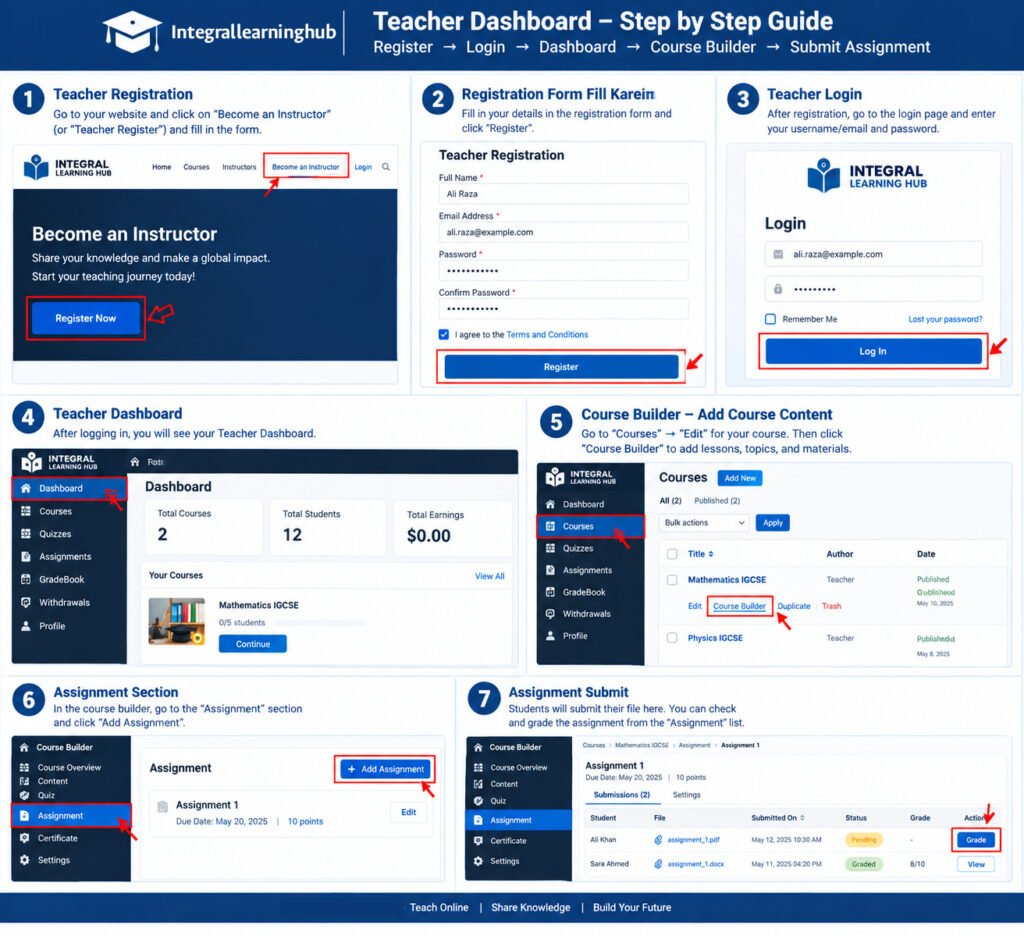
Welcome to Integral Learning Hub! This guide will help teachers understand how to register, log in, access the Teacher Dashboard, and manage their teaching activities.
1. Become a Teacher
To become a teacher, click “Become a Teacher” on the website and complete the registration/application process.
2. Teacher Login
After your teacher account has been created, use the “Teacher Dashboard” button to access your teacher area.
Enter your registered:
- Username or Email
- Password
Then click Login.
3. Teacher Dashboard
After successful login, you will be taken to your Teacher Dashboard.
From the dashboard, you can manage your available teaching/course options and access the teacher features provided by Integral Learning Hub.
4. Teacher Account
Please keep your login details secure and use the email address associated with your teacher account.
Need Help?
If you have any difficulty with your teacher account or dashboard, please contact the Integral Learning Hub Support Team.