Welcome to Integral Learning Hub
Welcome to Integral Learning Hub! This guide will help students register, log in, access their Student Dashboard, purchase courses, and start learning online.
1. Student Registration
To create your student account, click “Student Register” on the website.
Enter your required information and complete the registration process.
2. Student Login
After registration, click “Student Dashboard”.
Enter your registered:
- Username or Email
- Password
Then click Login.
3. Student Dashboard
After successful login, you will be taken to your Student Dashboard.
From your dashboard, you can access your enrolled courses and manage your student learning area.
4. Purchase a Course
Choose your desired course from the Courses section.
Open the course details, review the information, and complete the purchase/enrollment process.
5. Start Your Course
After you are enrolled in a course:
Student Dashboard → My Courses → Select Your Course → Start Learning
You can then access the available lessons and course materials.
6. Course Materials
Depending on the course, learning materials may include:
- 📚 Lessons
- 🎥 Online Classes
- 📄 Study Materials
- 📝 Quizzes & Activities
- 📖 Course Resources
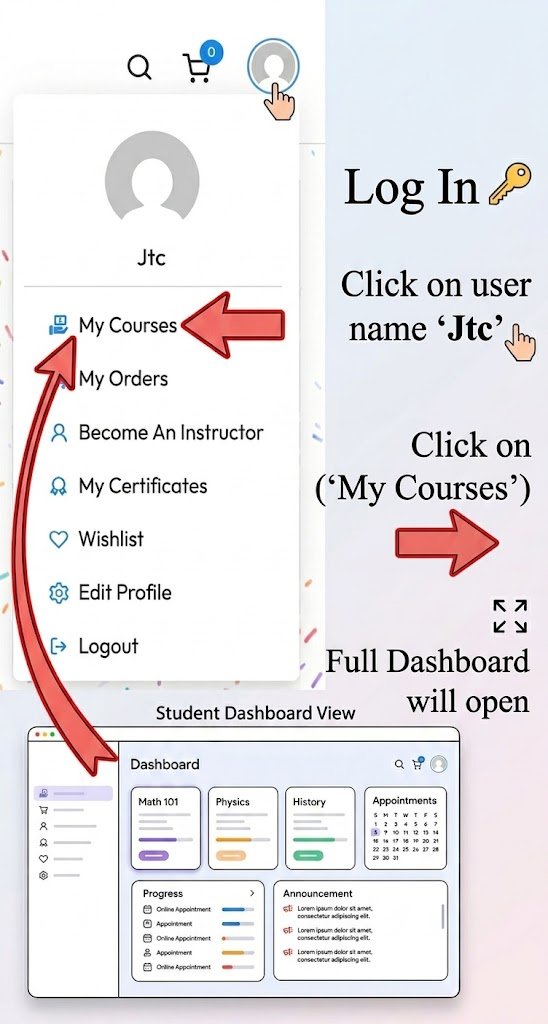
Here is the step-by-step guide for students to access their dashboard:
-
Log In: Log into your student account.
-
Open Profile Menu: Click on your profile icon or name (Jtc) at the top right corner.
-
Select “My Courses”: Click on the My Courses option from the dropdown menu (indicated by the red arrow in the image).
-
Access Dashboard: Once clicked, your main Student Dashboard will open, displaying your enrolled courses, announcements, and progress.
Need Help?
If you have any difficulty with your student account, course, or dashboard, please contact the Integral Learning Hub Support Team
Sign up to receive our latest updates
Get in touch
CAll us directly?
CAll us directly?
Address
Need some help?
International Test Prep
- IELTS Preparation
- GED Preparation
- TOEFL Preparation
- SAT Preparation